Revit MCP setup guide
Connect ChatGPT to Revit
To connect ChatGPT to Revit, install the VI MCP add-in, copy your key in Revit, and add
https://api.vi-mcp.cloud/mcp/ followed by the key to ChatGPT as a
custom MCP server. Then mention @VI MCP in a chat,
and ChatGPT reads and changes your live model in Revit 2022, 2023, 2024, 2025, 2026, 2027. It works on
ChatGPT Business, Enterprise and Edu, on the web.
Updated November 2026

Before you start
- Windows 10 or newer and Revit 2022, 2023, 2024, 2025, 2026, 2027
- Your Revit project open
- ChatGPT Business, Enterprise or Edu, in a browser
- On Business: you are a workspace admin or owner
Which ChatGPT plans work?
| Plan | VI MCP in ChatGPT |
|---|---|
| Business | ✓ Yes: workspace admins and owners add it |
| Enterprise, Edu | ✓ Yes: admins, owners and members they allow |
| Pro | — No: read and fetch actions only |
| Free, Go, Plus | — Not in OpenAI’s list |
ChatGPT treats every tool that is not marked read-only as a write action, and VI MCP’s tools change models, so they need a plan with write actions. See OpenAI’s Connecting custom MCP servers in ChatGPT. On any plan, Claude connects to VI MCP by itself: connect Claude to Revit. Using Gemini? See connect Gemini to Revit.
- 1
Install VI MCP and connect Revit
Install VI MCP and open Revit with your project. First time only: click Connect on the VI MCP tab, sign in with Autodesk and wait for the green dot.
Get it on Autodesk Marketplace - 2
Copy your key
On the VI MCP tab, click MCP Setup, then COPY JSON. Paste it into Notepad and copy only the key: the text after
Bearer, fromrevit_live_up to the closing quote."Authorization": "Bearer revit_live_…"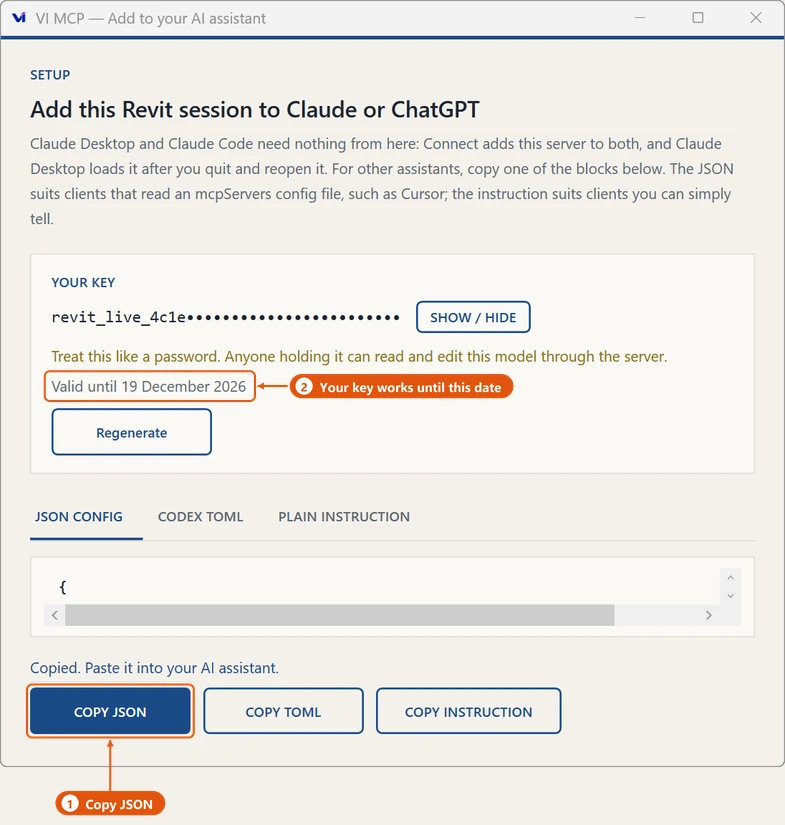
COPY JSON (1). The key works until the date shown (2). - 3
Add VI MCP to ChatGPT
In your browser, open chatgpt.com/plugins, click +, then Add custom MCP server, and fill in:
- Name
- VI MCP
- Server URL
-
https://api.vi-mcp.cloud/mcp/and your key right after it, with no space:https://api.vi-mcp.cloud/mcp/revit_live_… - Authentication
- No authentication
Tick I understand and want to continue, click Create as a plugin, then install the plugin.
- 4
Say hello to Revit
Keep Revit open and connected. Start a new chat, type @, pick VI MCP and send:
Say hello to Revit.
Confirm the VI MCP action when ChatGPT asks. ChatGPT replies with your Revit version, project and view: you are ready. Mention @VI MCP again in any later message that needs Revit; the choice applies to that message only.
Keep your key to yourself
The Server URL holds your key. Anyone who has it can read and change your models while your Revit is connected, so do not publish the plugin to your workspace or share the address. If it leaks, click Regenerate in MCP Setup: you get a new key and every other key of your account stops working.
A key lasts 30 days, and MCP Setup shows the date. After you sign in again or regenerate it, ChatGPT can no longer reach Revit: remove VI MCP from ChatGPT’s Plugins and add it again with the new key.
Troubleshooting
If ChatGPT cannot reach Revit
- ChatGPT cannot connect to the server
-
Check the Server URL:
https://api.vi-mcp.cloud/mcp/, then the key, with no space, quote orBearerin it. Authentication must be No authentication. - It worked before and stopped
- Open the VI MCP Connection window and check the green dot. If your key changed, add VI MCP to ChatGPT again with the new one.
- There is no Add custom MCP server
- Your plan or your workspace role does not allow it: see the plans above, or ask your workspace admin.
FAQ
ChatGPT and Revit: questions
- Can I use ChatGPT Plus or Pro with Revit through VI MCP?
- Not today. OpenAI gives custom MCP servers write actions only on ChatGPT Business, Enterprise and Edu. Pro can connect them for read and fetch actions only, and Free, Go and Plus are not in OpenAI’s list. Claude works with VI MCP on every plan, Free included.
- What can ChatGPT do in Revit with VI MCP?
- The same as any assistant connected to VI MCP: find, create, change and document elements in your live model with 300+ Revit tools. A destructive action runs as a dry run first and reports how many elements it would change.
- Why does ChatGPT ask me to confirm VI MCP actions?
- ChatGPT asks before it runs a tool that can change data, and VI MCP’s tools can. ChatGPT can remember your answer for that tool for the rest of the conversation; a new chat asks again.
- Does it work in the ChatGPT desktop or phone app?
- Add VI MCP on chatgpt.com in a browser. OpenAI documents custom MCP servers for ChatGPT on the web, and they cannot be connected on mobile.
- Can my whole team share one VI MCP plugin in ChatGPT?
- No. The address holds one person’s key, so everyone using it would work in that person’s Revit, under their account. Each person adds VI MCP with their own key; on Business, only admins and owners can add one.