Revit MCP setup guide
Connect Copilot to Revit
To connect Copilot to Revit, install the VI MCP add-in and add its server,
https://api.vi-mcp.cloud/mcp, with your VI MCP key
to GitHub Copilot’s mcp-config.json. Copilot then reads and changes your live
model in Revit 2022, 2023, 2024, 2025, 2026, 2027 from Agent mode in VS Code or from Copilot CLI. In Microsoft 365, a
Copilot Studio agent takes the same server, with each person’s own key.
Updated November 2026

Before you start
- Windows 10 or newer and Revit 2022, 2023, 2024, 2025, 2026, 2027
- Your Revit project open
- VS Code 1.99 or later with GitHub Copilot, on any plan
- On Copilot Business or Enterprise: the MCP servers in Copilot policy on
Which Copilot works?
| Where | VI MCP |
|---|---|
| GitHub Copilot in VS Code | ✓ Yes, on every Copilot plan |
| GitHub Copilot CLI | ✓ Yes, from the same mcp-config.json |
| Copilot Studio agent (Microsoft 365) | ✓ Yes, each user enters their own key |
| Microsoft Copilot app | — No: custom MCP servers are not documented there |
On Copilot Business and Enterprise, the MCP servers in Copilot policy is off by default and an admin turns it on; Free, Pro, Pro+ and Max need nothing. See GitHub’s MCP guide for Copilot Chat.
- 1
Install VI MCP and connect Revit
Install VI MCP and open Revit with your project. First time only: click Connect on the VI MCP tab, sign in with Autodesk and wait for the green dot.
Get it on Autodesk Marketplace - 2
Copy your key
On the VI MCP tab, click MCP Setup, then COPY JSON. Paste it into Notepad and copy only the key: the text after
Bearer, fromrevit_live_up to the closing quote.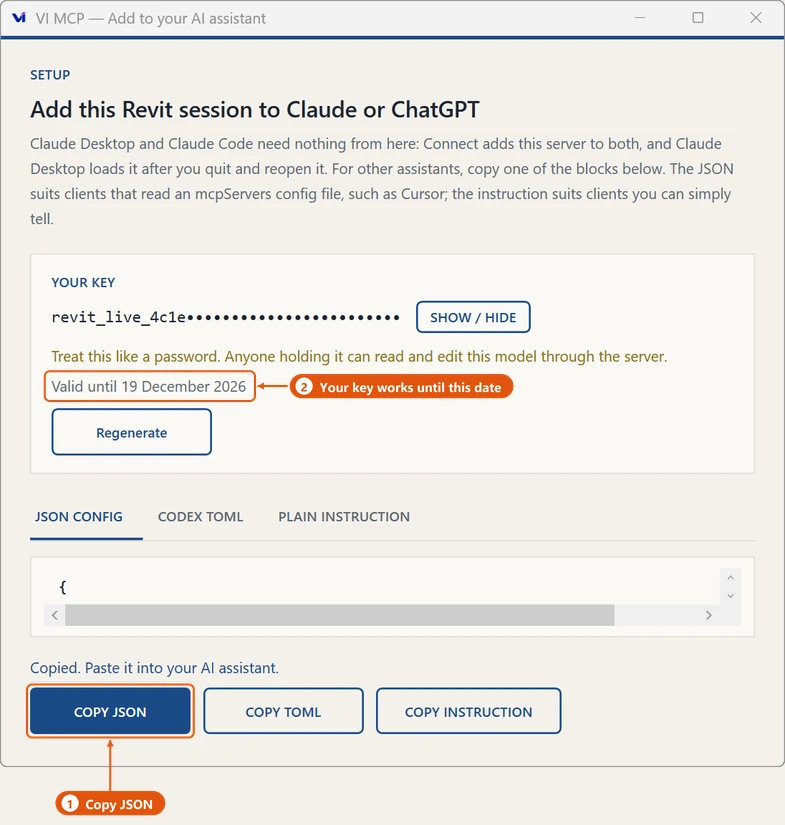
COPY JSON (1). The key works until the date shown (2). - 3
Add VI MCP to GitHub Copilot
Install VS Code and sign in to GitHub Copilot in it. Then open PowerShell, run this, and let Notepad create the file:
mkdir $HOME\.copilot -Force | Out-Null; notepad $HOME\.copilot\mcp-config.jsonPaste this in, put your key in place of
YOUR_KEYand save:{ "mcpServers": { "revit-vi-mcp": { "type": "http", "url": "https://api.vi-mcp.cloud/mcp", "headers": { "Authorization": "Bearer YOUR_KEY" }, "tools": ["*"] } } }If the file already lists servers, add only the
"revit-vi-mcp"entry inside"mcpServers", then restart VS Code. This is Copilot’s own configuration, which VS Code and Copilot CLI share; GitHub’s Copilot CLI MCP guide shows the same format. - 4
Say hello to Revit
Keep Revit open and connected. In VS Code, open Copilot Chat, choose Agent, and send:
Say hello to Revit using VI MCP.
Accept the trust request for revit-vi-mcp and allow its tool when VS Code asks. Copilot replies with your Revit version, project and view: you are ready.
Microsoft 365
Add VI MCP to a Copilot Studio agent
In Copilot Studio, open your agent and go to Tools, Add a tool, New tool, Model Context Protocol. Fill in:
- Server name
- VI MCP
- Server URL
https://api.vi-mcp.cloud/mcp- Authentication
- API key, type Header, header name
X-Api-Key
Click Create, create a connection with your own VI MCP key, and add the tool to the agent. Copilot Studio has each user of the agent provide their own key, so everyone works in their own Revit. See Microsoft’s guide to adding an MCP server to an agent.
Keep your key to yourself
The key sits in plain text in mcp-config.json. Anyone who has it can read and
change your models while your Revit is connected, so do not share or commit that file. If it leaks, click
Regenerate in MCP Setup: you get a new key and every other key
of your account stops working.
A key lasts 30 days, and MCP Setup shows the date. After you sign in again or regenerate it, put the new key in the file, or in your Copilot Studio connection.
Troubleshooting
If Copilot cannot reach Revit
- Copilot does not use VI MCP
-
Choose Agent in Copilot Chat: MCP tools work there. Check that the entry sits inside
"mcpServers"with no comma or quote missing, and restart VS Code. On Copilot Business or Enterprise, ask your admin whether MCP servers in Copilot is on. - VI MCP answers that the key is not valid
-
Check the key after
Bearerand one space. If your key changed, put in the new one. Keep Revit open with the green dot in the VI MCP Connection window.
FAQ
Copilot and Revit: questions
- Can I use Microsoft Copilot on Windows or the web with Revit?
- Not today. Microsoft documents custom MCP servers for GitHub Copilot and for Copilot Studio agents, not for the Copilot app. In Microsoft 365, build a Copilot Studio agent with VI MCP as a tool.
- Which GitHub Copilot plans work?
- Copilot Free, Pro, Pro+ and Max can use MCP servers. On Copilot Business and Enterprise, an admin must turn on the MCP servers in Copilot policy, which is off by default. VI MCP has its own free 30-day trial, then costs from $2.99/month.
- Does Copilot CLI need its own setup?
- No. Copilot CLI reads the same ~/.copilot/mcp-config.json. You can also add VI MCP from the CLI: copilot mcp add --transport http --header "Authorization: Bearer YOUR_KEY" revit-vi-mcp https://api.vi-mcp.cloud/mcp
- Can my team share one Copilot Studio agent?
- Yes. Copilot Studio has each user of the agent provide their own API key, so everyone works in their own Revit, under their own VI MCP account.
- What can Copilot do in Revit with VI MCP?
- The same as any assistant connected to VI MCP: find, create, change and document elements in your live model with 300+ Revit tools. A destructive action runs as a dry run first and reports how many elements it would change.