Revit MCP setup guide
Connect Kimi to Revit
To connect Kimi to Revit, install the VI MCP add-in and add its server,
https://api.vi-mcp.cloud/mcp, with your VI MCP key
to Kimi Code’s mcp.json. Kimi then reads and changes your live model in Revit
2022, 2023, 2024, 2025, 2026, 2027 when you ask, in Kimi Code Desktop or the Kimi Code CLI. Kimi Code comes with a
Kimi membership, Plus or above.
Updated November 2026

Before you start
- Windows 10 or newer, 64-bit, and Revit 2022, 2023, 2024, 2025, 2026, 2027
- Your Revit project open
- Kimi Code Desktop or the Kimi Code CLI
- A Kimi membership, Plus or above
Which Kimi works?
| Where | VI MCP |
|---|---|
| Kimi Code Desktop | ✓ Yes, with Kimi Plus or above |
| Kimi Code CLI | ✓ Yes, from the same mcp.json |
| Kimi chat (kimi.com) | — No: Kimi documents custom MCP servers only for Kimi Code |
Kimi Code shares the Kimi membership’s quota, and the Go plan has none for coding: see Kimi’s membership page. The desktop app and the CLI use the same MCP configuration.
- 1
Install VI MCP and connect Revit
Install VI MCP and open Revit with your project. First time only: click Connect on the VI MCP tab, sign in with Autodesk and wait for the green dot.
Get it on Autodesk Marketplace - 2
Copy your key
On the VI MCP tab, click MCP Setup, then COPY JSON. Paste it into Notepad and copy only the key: the text after
Bearer, fromrevit_live_up to the closing quote.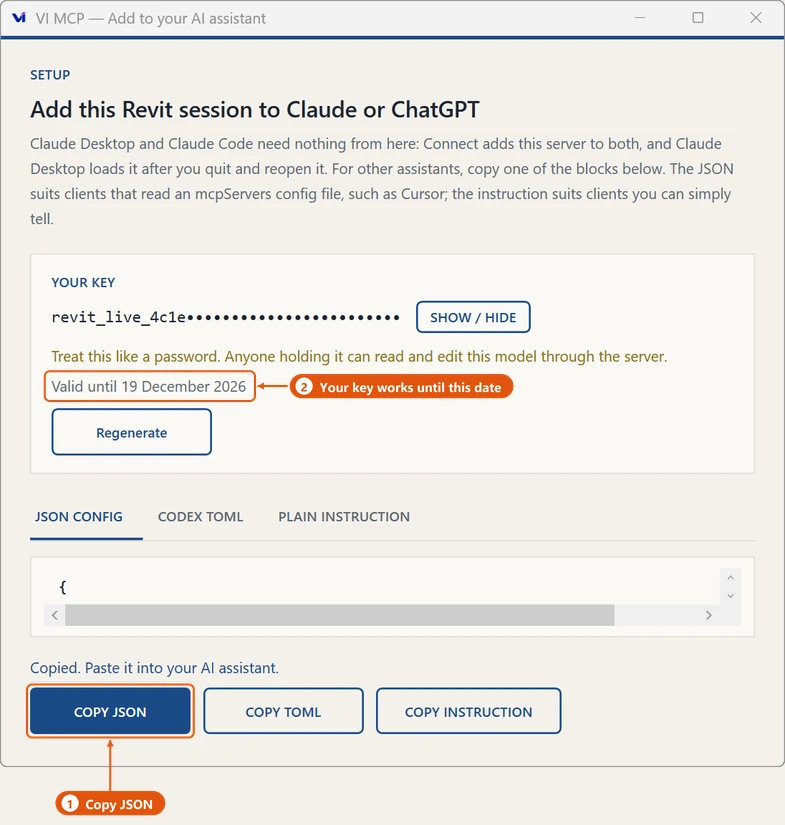
COPY JSON (1). The key works until the date shown (2). - 3
Add VI MCP to Kimi Code
Download Kimi Code Desktop, install it and sign in with your Kimi account. Then press Win + R, run this, and let Notepad create the file if it asks:
notepad %USERPROFILE%\.kimi-code\mcp.jsonPaste this in, put your key in place of
YOUR_KEYand save:{ "mcpServers": { "revit-vi-mcp": { "url": "https://api.vi-mcp.cloud/mcp", "headers": { "Authorization": "Bearer YOUR_KEY" } } } }If the file already lists servers, add only the
"revit-vi-mcp"entry inside"mcpServers". New Kimi Code sessions pick it up; sessions already open do not. The format is in Kimi Code’s MCP guide. - 4
Say hello to Revit
Keep Revit open and connected. Start a new session in Kimi Code and send:
Say hello to Revit using VI MCP.
When Kimi Code asks to run a VI MCP tool, choose Approve for this session. Kimi replies with your Revit version, project and view: you are ready.
Keep your key to yourself
The key sits in plain text in mcp.json. Anyone who has it can read and change
your models while your Revit is connected, so do not share or commit that file. If it leaks, click
Regenerate in MCP Setup: you get a new key and every other
key of your account stops working.
A key lasts 30 days, and MCP Setup shows the date. After you sign in again or regenerate it, put the new
key in mcp.json and start a new session.
Troubleshooting
If Kimi cannot reach Revit
- Kimi Code does not see VI MCP
-
Start a new session: open ones do not pick up changes. Check that the entry sits inside
"mcpServers"and that no comma or quote is missing. In the CLI,/mcpshows the server’s status. - VI MCP answers that the key is not valid
-
Check the key after
Bearerand one space. If your key changed, put in the new one. Keep Revit open with the green dot in the VI MCP Connection window.
FAQ
Kimi and Revit: questions
- Can I use Kimi on kimi.com with Revit?
- Not today. Kimi documents custom MCP servers only for Kimi Code, its desktop app and CLI. Use Kimi Code Desktop: it runs Kimi’s models and reads VI MCP from mcp.json.
- Which Kimi plan do I need?
- Kimi Code comes with a Kimi membership from Plus up (Andante and up on the legacy plans); the Go plan has no coding quota. VI MCP has its own free 30-day trial, then costs from $2.99/month.
- How do I stop Kimi Code asking before every VI MCP action?
- Choose Approve for this session when it asks, or add a permanent rule to ~/.kimi-code/config.toml: [[permission.rules]] with decision = "allow" and pattern = "mcp__revit-vi-mcp__*". A destructive action still runs as a dry run first and reports how many elements it would change.
- What can Kimi do in Revit with VI MCP?
- The same as any assistant connected to VI MCP: find, create, change and document elements in your live model with 300+ Revit tools.
- Does the Kimi Code CLI need its own setup?
- No. Kimi Code Desktop and the CLI read the same ~/.kimi-code/mcp.json. In the CLI, /mcp shows whether VI MCP is connected, and /mcp-config adds or edits servers without opening the file.